Case study · Internal infrastructure
Lucid Analytics.
Building my own analytics infrastructure.
An internal analytics platform built to monitor traffic and usage across my software projects, using a custom event collection and reporting infrastructure.
- Role
- Design, engineering, operation
- Type
- Internal tool, single-tenant
- Runs on
- Cloudflare Workers + D1
- Source
- qhak/lucid-analytics
Why I built it
I run several products, and I wanted one place to see how people find them and what they do once they arrive. I didn’t want to pay for a hosted analytics product for each site, or add cookie-based visitor tracking to sites that otherwise don’t need it.
The feature set grew from questions I wanted answered about my own sites. Where did this visit come from? Did the visitor engage, or bounce instantly? Which in-app browser sent them? Did that campaign produce sign-ups or only visits?
The problem it solves
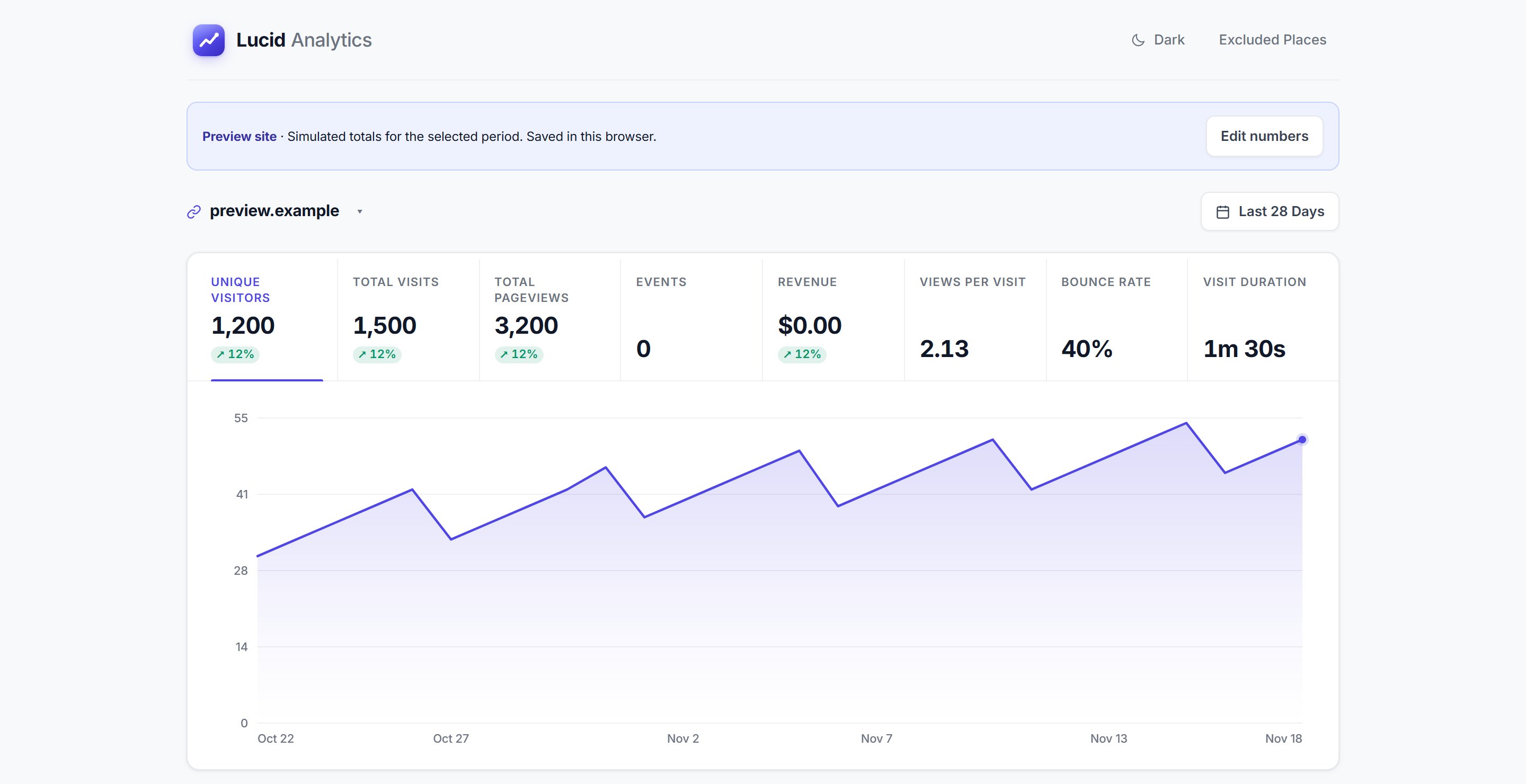
Lucid collects page views and custom events from every site I run and shows them in a single password-protected dashboard. Each site has its own view, and there is a combined view across all of them.
- Visitors, visits, page views, duration and bounce rate
- Referrers, channels, campaigns, entry and exit pages
- Browser, device, language and approximate location
- Custom events, event journeys and event-based revenue
- Recent visits and events with their dimensions
- Opt-outs, location exclusions and reversible bot rules
How the architecture works
Everything runs inside my own Cloudflare account: one Worker and one D1 database. The Worker serves the tracker script, receives events, and answers the dashboard’s API calls. There is no separate queue, cache server or third-party processor in the path.
- 01 Tracker
tracker.js
Sends page views, custom events and visible time with sendBeacon. Follows client-side navigation.
- 02 Ingest
POST /event
Worker checks origin, site allow-list and payload shape before anything is stored.
- 03 Enrich
worker.js
Parses the user agent, classifies the channel, hashes a daily visitor ID and stitches the visit.
- 04 Store
Cloudflare D1
Events, visit quality, sites and filtering rules in SQLite at the edge.
- 05 Report
/api/stats
Password-protected dashboard queries aggregates per site and date range.
Adding a site takes an allow-list entry and one script tag. The tracker sets no cookies. The Worker writes the endpoint into the script when it serves it, so the script never has to work out its own origin from the page.
<!-- On any tracked page -->
<script defer data-domain="example.com"
        src="https://your-worker.example.workers.dev/tracker.js"></script>

// Custom events
stats('signup_complete');
stats('scan_result', { tier: 'elite' });
Privacy choices and trade-offs
Lucid doesn’t set analytics cookies or use local storage to identify visitors. Daily visitor IDs are one-way hashes of the IP address and user agent with a salt. The IP address is discarded, never stored, and the ID changes at UTC midnight.
Returning-visitor reporting uses a separate hash that persists across days. It is a useful estimate, but it is still derived from IP and user agent, so it can be wrong when either changes. It is a deliberate privacy trade-off, not anonymous measurement. I document it that way in the repository rather than describing the tool as anonymous.
Ingest also checks consistency. An event must come from a site on the allow-list, and its page URL must match the request origin. Places I’ve excluded are dropped before anything is written. These checks are not proof of a human, since non-browser clients can forge an origin, so automation filtering is handled separately with rules I can review and reverse.
Engineering challenges
Keeping the dashboard private on a static asset layer
The dashboard is plain HTML, CSS and JavaScript served from Workers static assets. By default Cloudflare serves matching files straight from the asset directory, which would skip the Worker entirely and publish the dashboard to anyone with the URL.
The Worker is configured with run_worker_first, so every request passes through the password check. The tracker script is the only file allowed through without credentials.
Visits that survive an idle tab
The server closes a visit after 30 minutes without activity. A tab left open for hours never reloads, so the next click would start a visit with custom events but no pageview, no entry page and no source.
The tracker measures time hidden. When a tab comes back after the same 30-minute gap, it reopens the visit with a fresh pageview. The two values are documented as a pair because a mismatch would split visits in two.
Working within D1’s read allowance
Dashboard queries scan the events table, and D1’s free tier has a daily row-read limit. Private reads go through a short in-memory cache, and identical requests that arrive together share one query instead of running twice.
If the daily limit is reached, the dashboard serves the last good response marked as stale rather than failing. When there is nothing cached, it shows a clear message saying when queries resume.
Measuring engagement without identifiers
Visit duration comes from visible time, not from timestamps between pageviews. The tracker sends only newly elapsed visible milliseconds, on hide, on page exit and every 15 seconds while visible. The server clamps each value before adding it to the visit.
Scope and what it isn’t
Lucid is single-tenant. One dashboard password protects the instance, and there is no sign-up, billing, team accounts or public reports. That is a deliberate choice: it exists to answer my questions about my own products, and keeping it small is what keeps it easy to run.
- Cloudflare Workers
- Cloudflare D1
- JavaScript
- SQLite
- Wrangler